
An important function of running a successful wholesale or distribution business is wholesale inventory management. Even if the error is small, such as adding an extra unit to a customer's order, a mistake in inventory can cause stockouts, overstocking, late deliveries, missed sales, etc. when buying products in bulk, dealing with many suppliers and completing large orders for customers.
Spreadsheets, manual stocking, phone calls, and disconnected purchase records are still relied upon by many wholesalers. While these processes might work for a small business, they are challenging to manage as the number of products, warehouses, suppliers and customer orders grow.
Establishing a dependable wholesale inventory management system can assist business to grasp the quantity of stock available, the location of products, what has already been ordered and when to order more inventory. It also integrates the purchase, receipt and selling process along with the communication with the suppliers, ensuring everyone is working with the right information.
In this guide, you will learn about wholesale inventory management, how you can find a way to control the stock over different warehouses, how you can make your stock management process easier with a supplier purchase system, and how inventory management software can help you improve your stock management processes if you are a small wholesaler or a small distributor.
What Is Wholesale Inventory Management?
Wholesale inventory management involves the business' buying, monitoring, storing, arranging, and selling of goods in bulk quantities to other companies.
Wholesale inventory management typically has more product units, more locations to store the product, more suppliers, a larger order quantity, and negotiated prices, compared to retail inventory management.
For instance, a wholesale distributor might get 1,000 units of a product from a manufacturer, keep them in two warehouses and sell them to retailers and business customers in different numbers.
To effectively manage this process, the business should know:
- What quantities of each product are there now?
- Where is the stock located or stored?
- What is their level of inventory commitment to customers?
- What purchase orders are still to be delivered?
- Who are the suppliers of each product?
- When do you need to place more orders?
- What is the volume of business turning over in and out of the business?
Wholesale inventory management creates these activities into an ordered process. Wholesalers will be better able to make purchasing and sales decisions with complete information as opposed to incomplete information.
A wholesale inventory management system can assist you to organize product details and monitor warehouse stocks, mark stock movements and link stock activities with purchase orders and supplier transactions.
Why Is Wholesale Inventory Management Important?
Wholesalers and distributors have a considerable investment in their stocks. Investment in products continues to be locked up until products are sold and the money is recovered.
A lack of inventory control can impact the profitability of a business, along with the warehouse operations, customer relationships, and cash flow.
Let's look at the key aspects of why wholesale inventory management is important.
Avoid Overstocking and Unneeded Buying
Overstocking occurs when a company buys an excess of a product that the business does not need to sell in the allotted time.
A distributor for instance can buy 2,000 units as a supplier may give him a discount for buying in bulk. If the demand from the customers is 500 units over the coming couple of months, however, then the surplus stock can occupy warehouse space and can be a burden on the working capital.
Wholesalers should check before making a big purchase:
- Past sales and customer requirements.
- Current stock availability.
- Open purchase orders.
- Supplier delivery times.
- Minimum order quantities.
- Available storage capacity.
This can assist businesses make purchase decisions based on real inventory requirements as opposed to assumptions.
Prevent Stockouts
Stockout is a situation in which a business lacks sufficient stock to meet the needs of the customers.
This can be particularly hurtful to wholesalers since customers tend to order in bulk and demand goods at the time promised.
Let's go back to the retailer who places an order for 200 units with the distributor. The distributor confirms the order, but later finds he only has 120 units available.
The shortage can delay the operations of the customer and affect the customer-supplier relation.
Wholesalers can minimize the risk of stockouts when they have accurate records, conduct regular inventory checks, and place timely purchase orders.
Enhance Warehouse Inventory Management
Wholesalers tend to have their products in various warehouses, outlets, storage depots, or distribution centers.
With the absence of inventory tracking, staff may be aware of a product but not where it is located in the business.
Good inventory management is crucial for businesses to help them:
- Track stock by warehouse.
- Record incoming inventory.
- Record outgoing inventory.
- Monitor stock transfers.
- Identify inventory differences.
- Keep product records well organized.
Having visibility into the stock in each location enables teams to better fulfill and purchase.
Improve Supplier Purchasing Decisions
Suppliers have a direct impact on being able to have inventory available.
Waiting for deliveries, product price changes, varying quantities and poor purchase order records make the inventory planning complicated.
A structured purchasing process allows wholesalers to compare quotations from suppliers, review purchase prices, generate purchase orders and keep track of the outstanding deliveries.
Integrating supplier data and inventory records can enable businesses to make informed purchasing decisions.
Protect Cash Flow and Profit Margins
Too much stock ties up capital that can be used to run the business; too little stock can result in lost sales.
In both cases, it has a negative impact on profitability.
It is important for wholesalers to regularly check the status of their inventory values, buying prices, stock turnover and sales figures to learn how their working capital is being utilized.
Good inventory is not having more products available. It involves having the right products, the right quantities and the right locations.
Common Challenges in Wholesale Inventory Management
When it comes to managing wholesale inventory, it's far from the same game as handling a small retail business' merchandise. Wholesale companies have to manage bulk purchases, big orders from customers, dealing with many suppliers and more complex needs in their warehouses.
There are a number of challenges that wholesalers and distributors generally face:
1. Managing Large Product Catalogs
A wholesale business could have 100, 1,000, or even more products, with the individual products having their very own product code, product description, unit of measurement, purchasing price and selling price.
Without having product information stored in one place, employees can easily enter information more than once or use incorrect product information.
Solution: Have a single, standardized product catalog with product codes, product descriptions, units, cost and selling prices.
2. Managing Inventory Across Multiple Warehouses
If products are stored in different areas, the total stock needs to be supplemented by a description of where it is stored.
The counts of items in a distributor's warehouses could be 500 in Warehouse A and 300 in Warehouse B. If a customer places an order for 1,000 units but the business only records 800, employees may not know which location should fulfill the customer order.
Solution: Stock records are kept according to each warehouse, and each receiving transaction, delivery, adjustment and transfer is recorded against the appropriate location.
3. Managing Supplier Price Changes
Product prices are subject to change by suppliers due to market conditions, manufacturing cost, currency exchange rate changes, and changes in purchasing agreements.
A wholesaler could be quoting customers out-of-date prices if the purchase and product records are not kept up to date.
Solution: Maintain supplier quotes, negotiated prices and product purchase information. Check prices before giving new quotations or orders.
4. Manual Management of Purchase Orders
A lot of wholesalers are making their purchase orders with spreadsheets, email attachments or manually filled out documents.
This can lead to:
- Incorrect product quantities.
- Duplicate purchase orders.
- Missing order information.
- Mix-ups regarding delivery dates.
- Duplication of data between a buyer and a supplier.
Solution: An organized purchase order process that links product information, supplier information, ordered quantities and receiving information.
5. Keeping Accurate Stock Records
There may be discrepancies in inventory levels due to damaged goods, receiving items in the wrong quantity, not receiving items, items that are returned to the vendor, or data entry errors.
Without keeping a regular check on stocks and comparing them with the actual stock, there is a possibility for the purchasing and sales teams to make decisions based on the wrong stock figure.
Solution: Conduct periodic inventory checks, audit discrepancies and document changes, including reasons and history of transactions.
How to Manage Wholesale Inventory Step by Step
A standardized inventory management system keeps wholesalers in check and properly managed in stock, streamlines buying processes and facilitates inter-departmental communication.
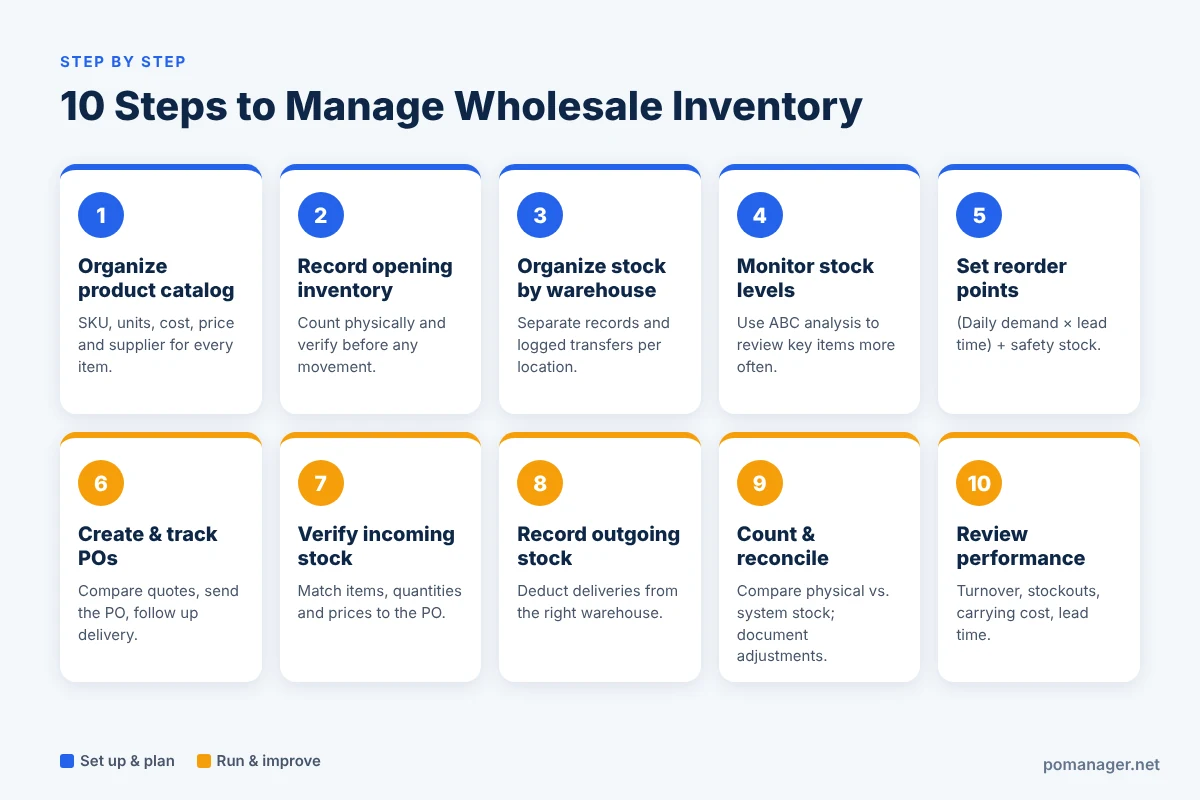
Below are 10 steps that businesses can take.
Step 1: Organize Your Product Catalog
Begin with setting up a well-organized record of each product.
The following should be included in each product:
- Unique product code / SKU number.
- Name and description of the product.
- Unit of measurement.
- Purchasing cost.
- Selling price.
- Supplier information.
- Barcode, where applicable.
- Current stock quantity.
For example:
| Product | SKU | Unit | Stock |
|---|---|---|---|
| A4 Paper | PAP-001 | Box | 450 |
| Office Chair | FUR-002 | Unit | 120 |
| Printer Ink | INK-003 | Pack | 280 |
Knowing the exact product reduces the confusion for employees when they are working on a purchase order, receiving a product, or preparing an invoice for a customer.
Units also need to be set up appropriately. When products are supplied in cartons but customers buy individual units, the conversion between these should be clearly recorded.
Step 2: Record Opening Inventory
Create accurate opening stock records before recording stock movements.
Count physically and compare the quantities of products with records.
Record the following for each item:
- Product code.
- Physical quantity.
- Warehouse location.
- Unit of measurement.
- The condition of the stock.
- Date of verification.
Do not take a spreadsheet for granted as having actual quantity information. Using verified stock records will provide a more solid basis for the business.
Step 3: Organize Stock by Warehouse
If you have several warehouses, record stock separately for each warehouse.
For example:
| Product | Warehouse A | Warehouse B | Total |
|---|---|---|---|
| Product A | 300 | 200 | 500 |
| Product B | 150 | 100 | 250 |
| Product C | 400 | 50 | 450 |
This helps to pinpoint all the products that are available, and which location will be able to deliver the orders.
If a product is moved from one warehouse to another, record the move, rather than just changing the quantity of products in a spreadsheet.
The necessary information for the transfer record is product, quantity, source warehouse, destination warehouse and date of transaction.
Step 4: Regularly Monitor Stock Levels
Wholesalers need to check stock on a regular basis, particularly for fast-moving items.
A helpful way to do this is to categorize products based on their value and importance to sales.
ABC inventory analysis groups products into A, B, and C categories:
- A items: Items that have a significant contribution to the business's inventory value or revenue. These typically need more monitoring.
- B items: Products of moderate business importance which require regular review.
- C items: Products that contribute a relatively low value to inventory, and might require a less complex handling process.
For instance, a distributor might know that their top products sell more quickly than the lower ones and consequently conduct weekly reviews for the top products and less frequent reviews for the slow-moving ones.
Assumed percentages should not be used as the basis for the exact classification, but instead the sales and inventory data of the company.
Step 5: Determine Reorder Points
The reorder point helps a business decide when to place a new purchase order.
The basic formula is:
Reorder Point = (Average Daily Demand × Supplier Lead Time) + Safety Stock
- Average Daily Demand is the average number of items sold per day.
- Supplier Lead Time is the average time it takes to receive items from the supplier after ordering.
- Safety Stock is extra stock kept to cover unexpected demand or delays.
For example:
- Average daily demand: 20 units
- Supplier lead time: 10 days
- Safety stock: 50 units
Reorder Point = (20 × 10) + 50
Reorder Point = 250 units
The business could aim to reorder products when their inventory level drops to around 250 units.
In addition, wholesalers should take the following into account for more accuracy:
- Open customer orders.
- Existing purchase orders.
- Supplier delivery reliability.
- Seasonal demand.
- Minimum order quantities.
The reorder point is a planning calculation. Don't confuse it with physical stock on hand, as some of that stock may already be committed to customers.
Step 6: Create and Track Purchase Orders
Purchase orders are vital to inventory management.
A Purchase Order (PO) is a document that records what a business needs to order from a supplier, such as the product information, quantities, prices, and agreed purchasing details.
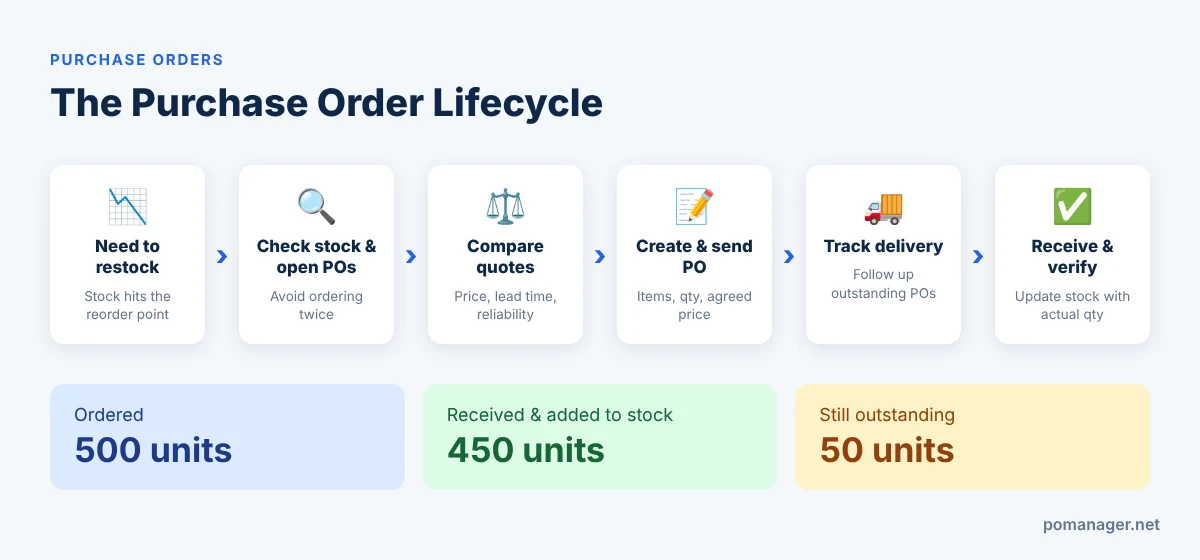
The purchase order process should be structured, with the following elements:
- Recognize the need to replenish products.
- Check the stocks and outstanding orders.
- Compare the price and terms of the suppliers.
- If required, compare supplier quotations.
- Prepare a PO.
- Send it to the designated supplier.
- Track the order until delivery is confirmed.
- Record the actual quantities received.
This will help wholesalers know which products are on order and which deliveries have not been received.
This also decreases the likelihood of ordering products twice.
Step 7: Verify Incoming Inventory
On receipt of products from a supplier, check the quantity received against the purchase order.
Check:
- If the correct products were received.
- If the quantities match.
- If any products are damaged.
- If the agreed prices are accurate.
- If it's a full or partial delivery.
For instance, if a business places an order for 500 items but the supplier only ships 450, the company should enter the actual number of items received (450) as well as the number still outstanding (50).
Don't assume the entire purchase order was received — check the receiving records and only update your stock accordingly.
Step 8: Record Sales and Outgoing Stock
Every customer order and product delivery impacts the inventory available.
When a business receives an order from a customer, it should confirm the products and quantities available before making any promise of delivery.
Once goods have been sent out, record the outgoing quantities against the appropriate warehouse.
This will help keep good records of stock and minimize the chances of selling the same stock twice.
Wholesale businesses can easily understand how products are flowing through the business when invoices, customer orders and delivery records are all connected.
Step 9: Complete Regular Stock Checks and Reconciliation
The actual physical stock level needs to be compared against the level of inventory recorded.
A reconciliation process is used to identify:
- Missing products.
- Damaged inventory.
- Incorrect receiving records.
- Unrecorded stock movements.
- Duplicate transactions.
- Data entry mistakes.
The counting frequency is not the same for all products.
High-value and fast-moving products may need frequent checking, while slower-moving products can be counted less often.
If an adjustment is made, it should be documented, so employees can find out why the quantity was adjusted.
Step 10: Review Inventory Performance
To keep wholesale stock management in check, it's important to keep a close eye on it.
When managing inventory, businesses should track indicators such as:
- Inventory turnover: the number of times inventory is sold and replaced in a period of time.
- Stockout rate: the percentage of time that products are not available at the time and place where they are needed.
- Carrying costs: the expenses involved with storing and holding inventory.
- Supplier lead time: the time it takes from order to receipt of the products.
- Inventory accuracy: how closely system stock levels match physical stock.
- Slow-moving inventory: goods that are held in stock for longer than the average period.
Wholesalers can use these indicators to see if there are any purchasing issues affecting their business and to make better inventory decisions.
How to Avoid Overstocking and Stockouts in Wholesale Businesses
Overstocking and stockouts are two common inventory problems. While they may seem like opposite situations, both can be caused by bad buying habits and incomplete or incorrect inventory information.
These are some easy tips to minimize both issues.
Leverage Historical Sales Data
Analyze past sales to get a sense of which products have steady demand and which have seasonal demand.
Don't buy something just because it sold recently or because the supplier has offered a discount.
Take Supplier Lead Times into Account
Some suppliers will deliver products within 2 or 3 days, others within a couple of weeks.
The longer the lead time, the sooner a purchase has to be made and the more attention safety stock planning needs.
Watch Outstanding Purchase Orders
Before placing additional orders, verify if items are already en route.
Failing to check open purchase orders (POs) could result in duplicate purchases and inventory build-up.
Identify Slow-Moving Products
Review products which have not sold for a long time.
Consider lowering future orders, running appropriate promotions, or adjusting purchase quantities.
Recheck Minimum Order Quantities
Suppliers might require buyers to purchase a minimum quantity.
Before agreeing, work out whether the extra stock is likely to sell and won't put you under extra storage and cash flow pressure.
Multi-Warehouse Inventory Management Made Easy
When a wholesaler has multiple warehouses, branches or distribution centers, multi-warehouse inventory management is crucial.
If there is no system in place, staff might find it difficult to determine where products are stored and which location should fulfill a customer's order.
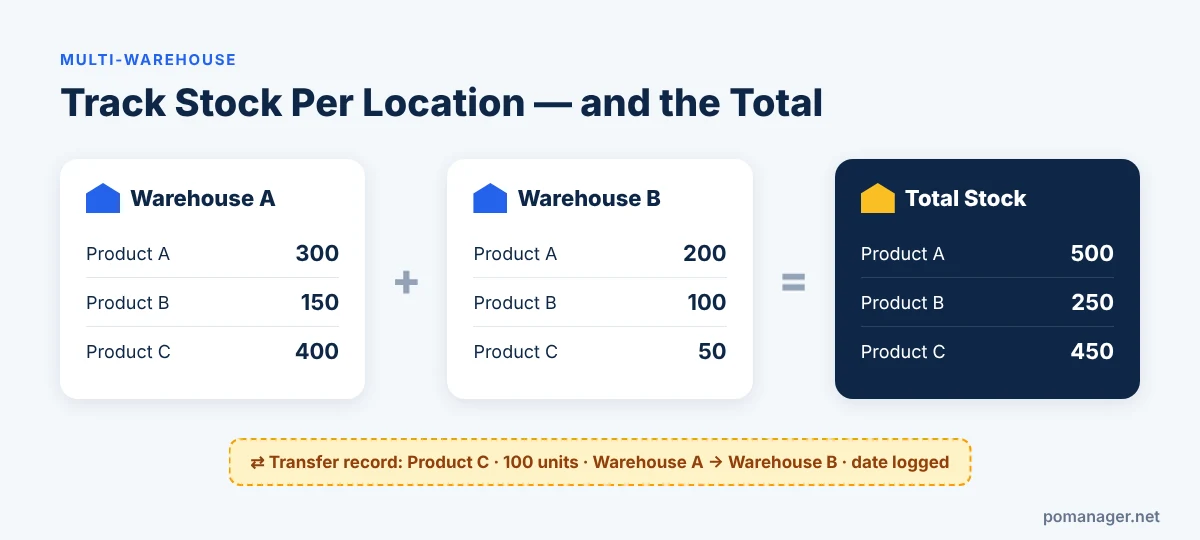
Practices that should be included in a structured multi-warehouse process are described below.
Use Separate Warehouse Records
Stock should be recorded separately for each warehouse.
This enables the business to see the stock on hand at each location, as well as the total figure.
Record Every Stock Transfer
If inventory is transferred from one warehouse to another, create a transfer record.
This should show the sending location, the receiving location, the product, the quantity and the date.
Standardize Product Identification
Ensure all warehouses use the same SKUs, product descriptions, etc.
This helps minimize confusion when employees search for products and compare stock quantities.
Track Receiving and Deliveries by Location
All products received should be booked to the warehouse where they are received.
Similarly, outgoing products should be deducted from the location that performs the delivery.
Review Branch-Level Inventory
Companies with multiple locations should review stock both at branch level and at consolidated level.
This helps management see which branches have too much stock on hand and which branches may need more.
Why Purchase Orders and Supplier Management Are Important for Inventory Control
Inventory management doesn't begin when products enter the warehouse. It begins with the business deciding what to buy and coordinating the purchase with suppliers.
POs, supplier quotes and delivery history are all vital sources of information for received goods.
Consider this example.
An office supplies distributor needs to order 300 boxes of paper.
The purchasing team requests quotes from three suppliers:
| Supplier | Quoted Price | Delivery Time |
|---|---|---|
| Supplier A | $18 | 7 days |
| Supplier B | $17 | 12 days |
| Supplier C | $19 | 5 days |
The lowest quotation is not always the best. Other factors the business needs to consider are delivery time, product quality, supplier reliability and total purchasing cost.
Once the business has chosen a supplier, it creates a purchase order and follows up on the order.
When the products arrive, the receiving team checks the actual quantity and records the stock in the respective warehouse.
If the supplier's invoice is attached to the purchase order (PO), the business can also cross-check the quantities and rates billed against the agreed terms.
This provides a more streamlined purchasing and inventory process.
The Benefits of Linking Supplier Transactions
A connected supplier process can help businesses:
- Minimize re-keying.
- Keep purchase orders organized.
- Compare supplier quotations.
- Track outstanding deliveries.
- Compare the supplier's invoice to the purchase order.
- Reduce communication errors.
- Keep more accurate purchase records.
These improvements can help wholesalers with inventory control when they buy products from various suppliers on a frequent basis.
Manual Inventory Management vs Inventory Management Software
Many small wholesalers begin by using simple Excel spreadsheets, owing to their simplicity and cost-effectiveness.
As a company grows, however, it can be challenging to keep track of inventory using an uncoordinated spreadsheet system.
Let's take a look at a comparison.
| Area | Manual Spreadsheets | Inventory Management Software |
|---|---|---|
| Stock tracking | Manual updates | Centralized stock records |
| Warehouse management | Separate sheets | Stock by location |
| Purchase orders | Manually prepared | Organized digital documents |
| Supplier communication | Emails and calls | Integrated supplier processes (when available) |
| Stock transfers | Manual entries | Recorded transfer transactions |
| Receiving | Manual reconciliation | Receipts linked to purchase records |
| Data accuracy | Depends on manual updates | Better-structured transaction records |
| Business visibility | Information spread across files | Centralized operational information |
For small businesses with a small number of products and simple operations, spreadsheets might still be helpful.
But for companies with extensive product lines, frequent buying and selling, multiple warehouses and frequent supplier transactions, dedicated inventory management software may be the better choice.
The right option will depend on business size, complexity, features available and budget.
Key Features to Look for in Wholesale Inventory Management Software
Wholesale inventory management software varies, and the right software should be selected based on your business requirements.
When choosing a system, here are some of the key features to look for.
1. Product and Stock Management
The software should help organize product catalogs, product codes, units of measure, cost and selling prices.
It should also give users clear, transparent information about stock.
2. Multiple Warehouse Management
For businesses with multiple warehouses, look for inventory management software that monitors inventory in each one and can record product transfers.
3. Purchase Order Management
The system should simplify creating purchase orders, tracking outstanding deliveries and organizing purchasing records for suppliers.
4. Supplier Quotation Management
When businesses have to make a purchase decision, comparing quotes from a variety of suppliers enables them to make informed decisions.
Look for software that manages quotations and supplier responses.
5. Inventory Receiving and Adjustments
Receiving should allow businesses to confirm that they received the products they ordered and record them so stock is updated accordingly.
The system should also document changes to the stock.
6. Sales and Invoicing
Stock should be linked with customer orders, sales invoices and deliveries.
A system that connects these transactions gives better operational visibility.
7. Supplier and Customer Connections
Another benefit is the ability to connect buyers and sellers so buying and selling documents can be exchanged between businesses without entering the same data again.
8. Ease of Use and Price
The software should be suitable for the size of your business.
Check its features, price, user limits, warehouse options, customer service and room for future growth before deciding.
How Pomanager Helps Wholesalers Manage Inventory and Suppliers
Stock records, buying processes and supplier transactions all come together to make wholesale inventory management more organized.
Pomanager is a business management platform for small businesses, wholesalers and trading companies. It integrates purchasing, quotations, sales, inventory, payments and supplier management in one business system.
Businesses can streamline important activities and manage them in one place without juggling numerous spreadsheets and email messages.
Manage Inventory Across Multiple Warehouses
Pomanager keeps stock records per location.
Businesses can use multiple warehouses and record stock movements, stock transfers and inventory adjustments.
This helps wholesalers know where their products are and keep better stock records.
Create and Monitor Purchase Orders
Pomanager lets businesses generate purchase orders based on product and supplier information.
Purchase orders can be created from scratch, from supplier quotations or from low stock recommendations.
Partial deliveries are also tracked, allowing businesses to keep track of outstanding quantities.
Request and Compare Supplier Quotations
A request for quotation can be sent to up to five suppliers, rather than having separate conversations with each supplier.
Supplier responses can be monitored and compared with each other.
The chosen quotation can then be converted to a purchase order without re-keying the same product lines.
Connect Purchase Orders Between Buyers and Suppliers
One of Pomanager's major differences is its connected business network.
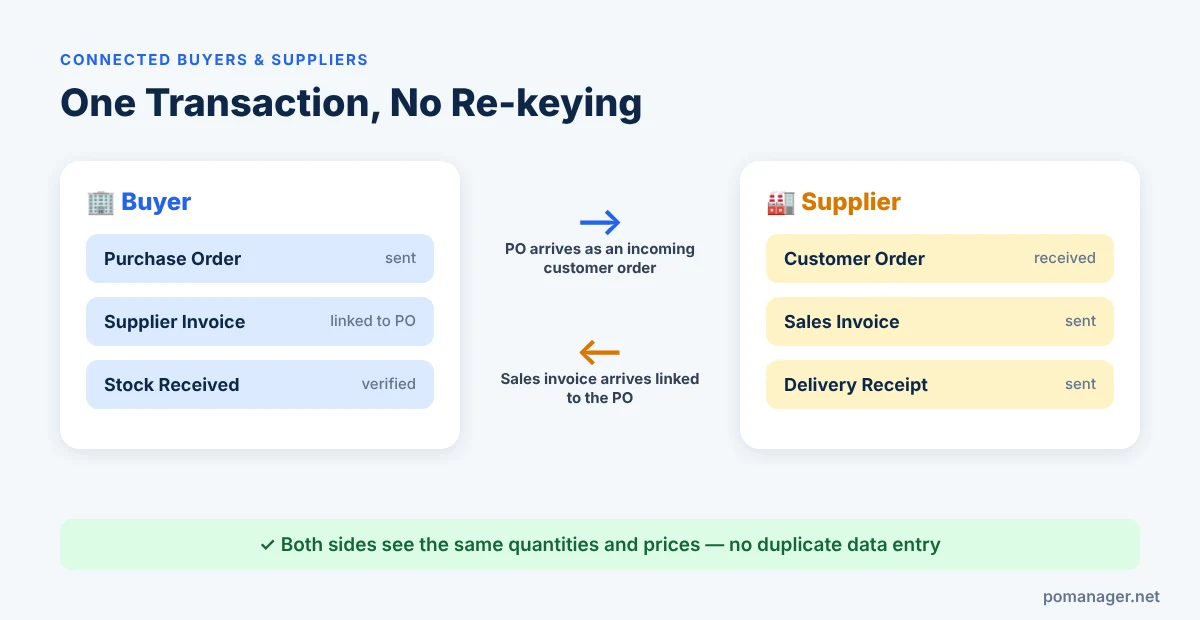
If you have a buyer/supplier business relationship, a purchase order from the buyer appears in the supplier's system as an incoming customer order.
This reduces the need for both businesses to manually enter the same transaction.
Link Supplier Invoices to Purchase Orders
A connected supplier can send a sales invoice which is received in the buyer's system together with the related purchase order.
The buyer can review and confirm the invoice instead of re-entering it.
This helps keep a better link between the purchase document and the supplier's invoice.
Manage Supplier and Customer Transactions
Pomanager also lets you handle quotations, sales invoices, delivery receipts, payments and messages with your trading partners.
With connected workflows, there's no need to manually re-enter data as documents flow between trading partners.
Convert Existing Documents with AI
Pomanager also has an AI document conversion option that can help convert data from formats such as spreadsheets, emails, PDFs, and more into draft business documents.
Users can review and accept the drafts.
For small wholesalers and distributors, these features can make purchasing, supplier communication and inventory activities more connected in the business workflow.
Explore Pomanager:https://pomanager.net/
You can also try its free plan and see whether it meets your business needs.
Best Practices for Wholesale Inventory Management
Creating an effective inventory process is more than just picking software. Consistent procedures are key, and employees need to follow them.
Take into account the following best practices:
- Have precise product codes and descriptions.
- Log all inventory coming in and going out.
- Maintain separate inventory records for each warehouse.
- Check unfulfilled purchase orders before ordering.
- Compare quotes when ordering in bulk.
- Check received quantities against purchase orders.
- Take stock counts regularly.
- Track high-value and slow-moving products.
- Analyze supplier delivery performance.
- Maintain a link between purchasing, sales and inventory records.
- Establish standard operating procedures for inventory.
- Regularly analyze and act on inventory performance to improve buying decisions.
These strategies can help wholesalers minimize operational mistakes, have better visibility of their stock, and make better purchase decisions.
Frequently Asked Questions About Wholesale Inventory Management
What is wholesale inventory management?
Wholesale inventory management involves the buying, monitoring, keeping, and distribution of items that a company resells in bulk to other companies. It covers product storage, inventory control, warehouse management, procurement, receiving and replenishment.
How can small wholesalers manage inventory?
With an organized product catalog, a record of inventory changes, tracking of purchases from suppliers, checking stock levels in the warehouse, and regular inventory reviews, small wholesalers can manage their inventory. As the business expands, inventory management software can help streamline these activities.
How do you monitor wholesale inventory?
The most effective approach is to keep accurate product records and record all inventory transactions such as purchases, receipts, sales, deliveries, transfers and adjustments. If you have several warehouses, monitor your inventory by warehouse.
What is wholesale inventory management software?
Wholesale inventory management software is an application that enables wholesalers to manage products, track inventory, manage purchases and monitor inventory across warehouses. Depending on the software, it can also support supplier quotations, sales orders, invoicing and business integration.
How can wholesalers avoid overstocking?
By understanding sales history, current inventory levels, outstanding purchase orders, supplier lead times and reorder points, wholesalers can minimize overstocking. They should also identify slow-moving products before placing additional orders.
How can wholesalers avoid stockouts?
To minimize stockouts, businesses track inventory, set reorder points, keep appropriate safety stock, and account for supplier delivery times. Checking open orders can also reduce unnecessary replenishment delays.
How should you manage inventory across multiple warehouses?
Keep inventory separately for each warehouse, track stock moving in and out of each warehouse, and record all transfers. Regular stock checks at each warehouse also help detect discrepancies.
What is the difference between inventory management and stock control?
Inventory management is the overall buying, holding, tracking and replenishing of products. Stock control is a more focused practice of keeping track of stock, identifying discrepancies and ensuring stock accuracy.
Why are purchase orders important in wholesale inventory management?
Purchase orders are records of the items a business wants to buy from a supplier. They help wholesalers organize ordered quantities, agreed prices, outstanding deliveries and incoming stock.
How does supplier management impact inventory?
Supplier management affects product availability, purchasing cost, delivery time and replenishment planning. Wholesalers make better purchasing decisions by organizing supplier records and comparing supplier quotations.
Does inventory management software support multiple warehouses?
Yes. Some inventory management systems let businesses store stock across multiple warehouses so they can monitor inventory by warehouse, make transfers, and view inventory across all branches. Available capabilities depend on the software.
Is inventory management software beneficial for small wholesale businesses?
Yes. Centralized product records, organized purchasing, warehouse stock monitoring, and supplier transaction management are some of the advantages small wholesale businesses can gain. With the right software set up, manual effort can be reduced and day-to-day operations become easier to handle.
Can a purchase order automatically update inventory?
This depends on the software and its receiving workflow. Many systems record the purchase order as expected or incoming stock, but the stock itself doesn't increase until it arrives and is verified.
What should wholesalers look for when choosing inventory software?
Wholesalers should consider product management, stock tracking, multiple warehouse support, purchase order management, supplier quotations, receiving, stock transfers, sales invoicing and supplier connections.
How can Pomanager support wholesale businesses?
Pomanager is wholesale management software that organizes purchase orders, supplier quotations, inventory, multiple warehouses, sales invoices, delivery receipts and related supplier transactions. Its business network lets buyers and suppliers share documents without entering the same data repeatedly.
Final Thoughts
Wholesale inventory management isn't just about keeping track of the number of products in the warehouse. It includes coordinating customer orders, deliveries, supplier relations, purchasing, and inventory movement.
When these activities are handled separately, businesses can suffer from stock discrepancies, over-purchasing, late deliveries, and duplicate manual effort.
A structured inventory management process enables wholesalers to keep better track of stock, plan inventory purchases with suppliers, and make better business decisions.
A business management solution that centralizes inventory, purchasing and supplier management can help small wholesalers and distributors manage day-to-day operations more easily.
Keep inventory records accurate, buy products at the right time, fulfill customer orders reliably, and build a more organized wholesale business.